
Sale!



Background
Add-ins, Drawings, Inventor
Drawing Assistant
Original price was: 19,99 €.14,99 €Current price is: 14,99 €.
VAT exempted according to UStG §19
Boosts drawing creation process
Introduction
Inventor Drawing Assistant is your ultimate companion in the 2D drawing creation process.
If you are Tired of tedious dimensioning and drawing cleanup? Drawing Assistant is the powerful Autodesk® Inventor® add-in that automates and streamlines your detailing process, turning hours into minutes.
Key Features That Transform Your Workflow
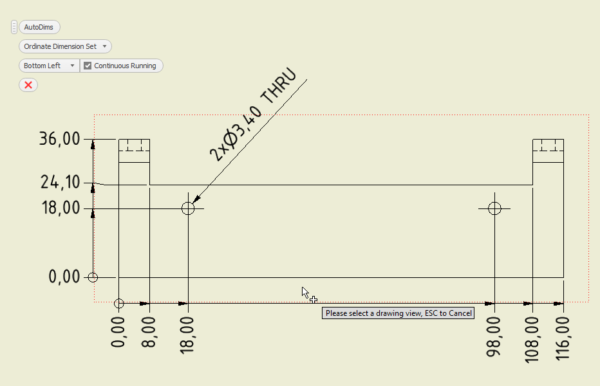
- AutoDim in a Single Click: Instantly generate all necessary dimensions for a drawing view with the groundbreaking AutoDim function.
- Next Dimension Supercharge: Quickly Center, Arrange, and Add Overall Dimensions with handy one-click tools right next to standard dimensioning.
- Balloon & Parts List Mastery: Effortlessly Add, Find, and Delete Balloons. Keep your Parts Lists pristine with Purge Empty Columns and Auto-Fit options.
- Instant Cleanup: Utilize powerful General Functions like Delete Sick (to remove erroneous values), Clear Sheet, and tools to remove all Center Lines/Marks and Symbols instantly.
- Seamless Compatibility: Works flawlessly with all versions of Inventor starting from 2020 (offering both free and premium features).
Background
General Usage Instructions
Inventor Drawing Assistant offers free and premium functions.
General functions:
- Delete sick: Deletes sick values on the sheet (Dimensions, Balloons, Bend Notes, etc)
- Clear Sheet: Clears all Components inside the active sheet
- Delete Symbols: Removes all symbols inside the active sheet
- Rename Sheets: Renames all sheets to their referencing documents
- Update All: Sync perfection. Update every view and model in one click
Dimensions:
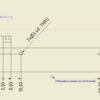
- AutoDim: Adds dimensions and hole information to the selected view
- Add Bend Dims: Instant, precise dimensions for your flat pattern Bend Lines.
- Add Overall Dims: Adds overall dimensions to selected Views
- Center Dims: Centers the Dimensions to the middle of the Dimension line
- Arrange Dims: Arranges all Dimensions
- Center + Arrange Dims: Centers and arranges all Dimensions
- Hole And Threads: Intelligent callouts that automatically select the perfect view for every hole and thread
- Delete Hole/Thread Notes: Effortlessly clear all notes for a pristine layout
- Delete all Dims: Delete all Dimensions
Parts List:
- Purge Empty Columns: Removes all empty Columns from all Parts Lists
- Auto-Fit: Auto-Fit all Parts list Columns and Rows
Center Lines/Marks:
- Add Center Marks/Lines: Adds Center Marks and Lines to all/selected Drawing views
- Remove Center Lines: Removes all Center lines from all/selected Drawing views
- Remove Center Marks: Removes all Center Marks from all/selected Drawing views
- Remove Center Lines + Marks: Removes all Center Marks and Center Lines from all/selected Drawing views
Balloons:
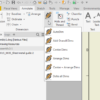
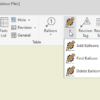
- Add Balloons: Adds Balloons to all/sel Views
- Find Balloon: Finds the position of the Balloon on the sheet
- Delete Balloons: Removes all Balloons
There will be more functions in the next Versions.
Installation/Uninstallation
Installation guide: https://youtu.be/8Sb7y-XD9qI?si=v8kJ8u1E4Jyfm5Ca
The Add-in works for Autodesk® Inventor® releases since 2020.
The installer that ran when you downloaded this app/plug-in will start installing the app/plug-in. OR double-click the downloaded installer to install the app/plugin.
You can unload the plugin without uninstalling it by unchecking the “Loaded/Unloaded” checkbox associated with the plugin in the Inventor Add-In Manager. You may have to restart Inventor to unload the application completely.
To uninstall this plug-in, exit the Add-in if you are currently running it, simply rerun the installer, and select the “Uninstall” button. OR you can uninstall it from ‘Control Panel/Programs and Features’ (Windows 7/8.1/10/11), just as you would uninstall any other application from your system.
**License Types**
| License Type | Validity | Scope | Key Feature |
| Single App/Yearly | One year | One Add-in (e.g., Drawing Assistant only) | Free updates |
| All Apps/Yearly | One year | All Add-ins (ADC, Drawing Assistant, etc.) | Free updates |
| Single App/Lifetime | Lifetime | One Add-in (e.g., Drawing Assistant only) | Includes 1 year of free updates |
| All Apps/Lifetime | Lifetime | All Add-ins (ADC, Drawing Assistant, etc.) | Includes 1 year of free updates |
Each app offers a 15-day annual trial.
Licenses are floating, allowing users to sign in and out as needed.
Need help? Contact us
30-day money-back Guarantee!
Downloads:
Version Number: 27.0.0
- Update for Inventor 2027
- Button: Add Center Lines/Center Marks
Version Number: 26.0.3
- Button: Add Bend Dimension
- Buttons: Hole And Threads, Delete Hole/Thread Notes
- Button: Update All
Version Number: 26.0.1
- Buttons for Part list( Purge Empty Columns, AutoFit)
- Buttons For Center Lines and Center Marks
- Optimised Workflow
| Select License | Single App/Yearly, All Apps/Yearly, Single App/Lifetime, All Apps/Lifetime |
|---|
Only logged in customers who have purchased this product may leave a review.
Related products
-
 Add-ins
SMDC(Sheet Metal Drawing Creator)
19,99 €VAT exempted according to UStG §19Select options This product has multiple variants. The options may be chosen on the product page -

-

-
Sale!
 Add-ins
Browser Rearranger
Original price was: 9,99 €.4,99 €Current price is: 4,99 €.VAT exempted according to UStG §19Select options This product has multiple variants. The options may be chosen on the product page
Reviews
There are no reviews yet.