
Sale!



Add-ins, Assemblies, Drawings, Inventor, Parts, Presentations
AutoSave
Original price was: 9,99 €.4,99 €Current price is: 4,99 €.
VAT exempted according to UStG §19
Saves Documents automatically
Inventor AutoSave
Introduction
Stop Losing Valuable Inventor Work to Crashes! Have you ever experienced the frustration of an Autodesk Inventor crash, only to realize you lost hours of unsaved work? It’s a common and costly problem for designers and engineers. Blue Mech Inventor AutoSave is the essential add-in designed to eliminate this risk, automatically securing your progress in the background so you can focus on your designs, not worrying about data loss.
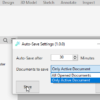
Inventor AutoSave automatically saves documents for Autodesk® Inventor® users after a set period.
Background
What is the Problem?
The Problem: Unexpected Crashes and Forgotten Saves In the demanding world of CAD design, unexpected software crashes or simply forgetting to hit save can lead to significant setbacks. Losing complex designs, detailed drawings, or intricate assemblies means wasted time, missed deadlines, and unnecessary stress.
General Usage Instructions
Inventor AutoSave: Your Automatic Data Protection Solution Blue Mech Inventor AutoSave acts as your silent partner, constantly protecting your valuable work. This highly efficient add-in automatically saves your documents in the background, providing unmatched data security and an uninterrupted workflow.
Key Benefits:
- Never Lose Work Again: Automatic background saving prevents data loss from unexpected crashes or power outages.
- Supports All Inventor Document Types: Reliably saves parts (.ipt), assemblies (.iam), drawings (.idw/.dwg), and presentations (.ipn).
- Intelligent Saving: Only saves documents when changes have been made, keeping your Inventor process clean and efficient.
- Control During Migration: Provides the option to save or cancel during file migrations, preserving your original files.
- Peace of Mind: Focus on your design work with confidence, knowing your progress is automatically secured.
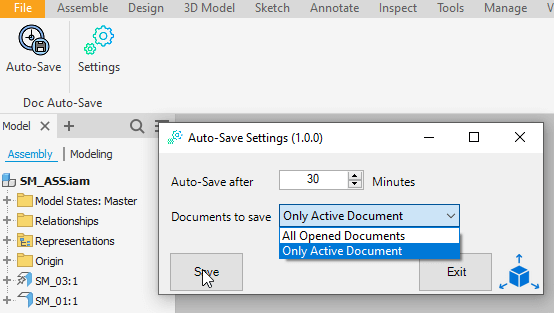
Setting the AutoSave interval to a minimum of 15 minutes is generally advisable to enhance document security and data protection.
Inventor AutoSave is a highly efficient tool that consistently and automatically saves documents in the background, ensuring data security and uninterrupted workflow for users.
It ensures the saving of all types of documents, including parts, assemblies, drawings, and presentations.
If your files need to be migrated, Inventor AutoSave gives you the option to save or cancel the saving process using the Inventor Save Dialog. This is important for preserving the original files and ensuring they remain unchanged.
AutoSave will only save the document if changes are made. This helps keep the Inventor process clear for users.
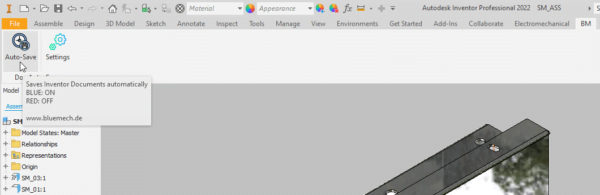
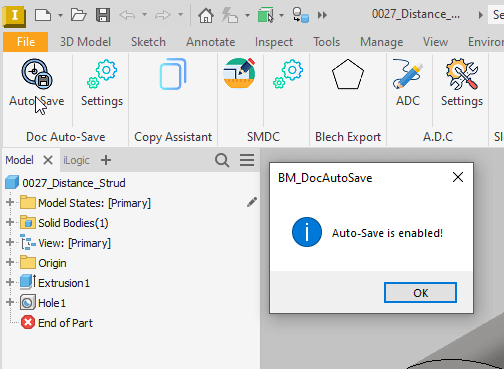
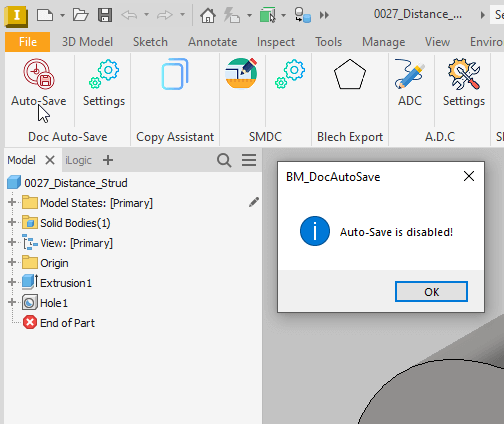
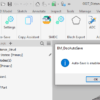
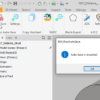
Simple and Intuitive Inventor AutoSave operates seamlessly in the background. The application’s icon in Inventor visually indicates its status:
- Blue Icon: AutoSave is enabled and actively protecting your work.
- Red Icon: AutoSave is disabled. Click the icon to re-enable.
You can easily toggle AutoSave on or off by clicking the icon.
Installation/Uninstallation
Installation guide: https://youtu.be/8Sb7y-XD9qI?si=v8kJ8u1E4Jyfm5Ca
The Add-in works for Autodesk® Inventor® releases since 2020.
The installer that ran when you downloaded this app/plug-in will start installing the app/plug-in. OR double-click the downloaded installer to install the app/plugin.
You can unload the plugin without uninstalling it by unchecking the “Loaded/Unloaded” checkbox associated with the plugin in the Inventor Add-In Manager. You may have to restart Inventor to unload the application completely.
To uninstall this plug-in, exit the Add-in if you are currently running it, simply rerun the installer, and select the “Uninstall” button. OR you can uninstall it from ‘Control Panel/Programs and Features’ (Windows 7/8.1/10/11), just as you would uninstall any other application from your system.
**License Types**
| License Type | Validity | Scope | Key Feature |
| Single App/Yearly | One year | One Add-in (e.g., AutoSave only) | Free updates |
| All Apps/Yearly | One year | All Add-ins (ADC, AutoSave, etc.) | Free updates |
| Single App/Lifetime | Lifetime | One Add-in (e.g., AutoSave only) | Includes 1 year of free updates |
| All Apps/Lifetime | Lifetime | All Add-ins (ADC, AutoSave, etc.) | Includes 1 year of free updates |
Each app offers a 15-day annual trial.
Licenses are floating, allowing users to sign in and out as needed.
Need help? Contact us
30-day money-back Guarantee!
Downloads
Only logged in customers who have purchased this product may leave a review.
Related products
-
Sale!
 Add-ins
Automatic Drawing Creator (ADC)
29,99 €VAT exempted according to UStG §19Select options This product has multiple variants. The options may be chosen on the product page -
Sale!
 Add-ins
SMA (Slot Mid-Axis)
Original price was: 9,99 €.4,99 €Current price is: 4,99 €.VAT exempted according to UStG §19Select options This product has multiple variants. The options may be chosen on the product page -
Sale!
 Add-ins
Workspace
Original price was: 9,99 €.4,99 €Current price is: 4,99 €.VAT exempted according to UStG §19Select options This product has multiple variants. The options may be chosen on the product page -
Sale!
 Add-ins
Browser Rearranger
Original price was: 9,99 €.4,99 €Current price is: 4,99 €.VAT exempted according to UStG §19Select options This product has multiple variants. The options may be chosen on the product page
Reviews
There are no reviews yet.